1. Database Setup mongo atlas
1. Setting Up MongoDB with MongoDB Atlas
Follow these steps to set up MongoDB Atlas for your project.
-
Login to MongoDB Atlas
Register or log in to MongoDB Atlas here: MongoDB Atlas | MongoDB. -
Create a New Project
- After logging in, click on Create New Project.
- Enter a project name, click Next, and then Create Project.
-
Create a New Deployment
- Go to Deployment.
- Choose Create New Deployment and select the Free option.
- Select the Mumbai/India server (or choose another location based on your preference).
-
Configure Security Quick Start
a. Database Access (Username & Password)
- Create a username and password, for example:
- Username:
aakash - Password:
223
- Username:
- Click Create User and assign the built-in role readWriteAnyDatabase for full read and write access.
b. Choose Connection Environment
- When prompted with "Where would you like to connect?", select "Local Environment".
c. Network Access (IP Whitelisting)
- Go to Network Access.
- Add an IP address for access; enter
0.0.0.0/0to allow access from anywhere, then click Add Entry.
- Create a username and password, for example:
-
Get the Connection String
- Go to Database Deployments.
- In Cluster0, click Connect > Compass.
- Copy the connection string provided for MongoDB Compass or MongoDB URI for use in your project.
![[../attachments/mongodb_atlas.mp4]]
2. Implementing MongoDB in the Backend to connect with Frontend
we created a folder structure like this which will handle the whole project
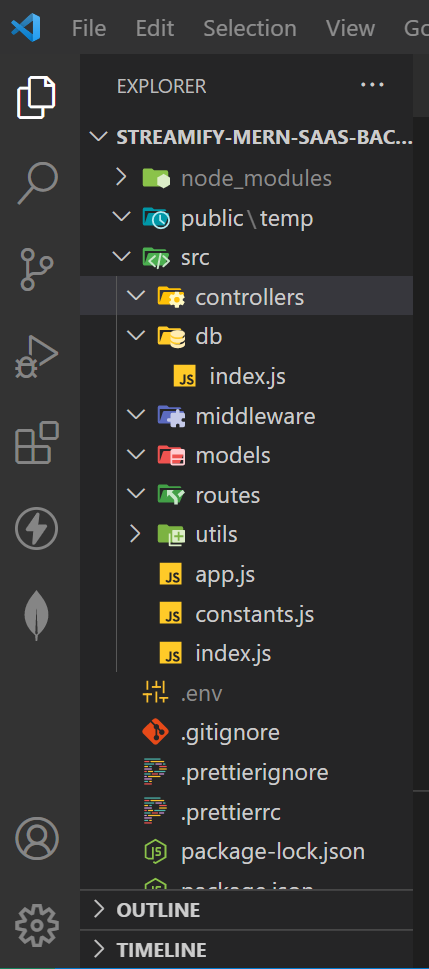
1. Setting Up the .env File
- Copy the Connection String from MongoDB Atlas and add it to your
.envfile. This will store sensitive information like your server port and MongoDB URI.
.env
 PORT= 8000
 MONGODB_URI= mongodb+srv://sanskarbhushankar01:password@cluster0.m8o04.mongodb.net
2. Setting Up src/constant.js
- In the
srcdirectory, create a file namedconstant.jsto store application-wide constants.
src/constant.js
export const DB_NAME = "onlyTube";
3. Code to Connect MongoDB with Mongoose
- Ensure your project structure is set up.
- In the
src/dbdirectory, create anindex.jsfile to establish a connection to MongoDB.
src/db/index.js
import mongoose from 'mongoose';
import { DB_NAME } from "../constant.js";

const connectionDB = async () => {
    try {
        const connectionInstance = await mongoose.connect(`${process.env.MONGO_URI}/${DB_NAME}`);
        console.log(`MongoDB connected on host ${connectionInstance.connection.host}`);
    } catch (error) {
        console.log("Connection Error:", error);
        process.exit(1);
    }
};

export default connectionDB;
4. Import and Call the Database Connection in index.js
- In the main
src/index.jsfile, import and call theconnectionDBfunction to initiate the database connection. - Ensure that Nodemon is configured in
package.json.
backend/index.js
import connectionDB from "./db/index.js";
import dotenv from 'dotenv';

dotenv.config({
    path: "./.env"
});

connectionDB();
and run npm run dev